Tools & Workflow · 2026
AI Production Acceleration
Turning repeatable brand rules into working production tools, beginning with a live procedural background generator.
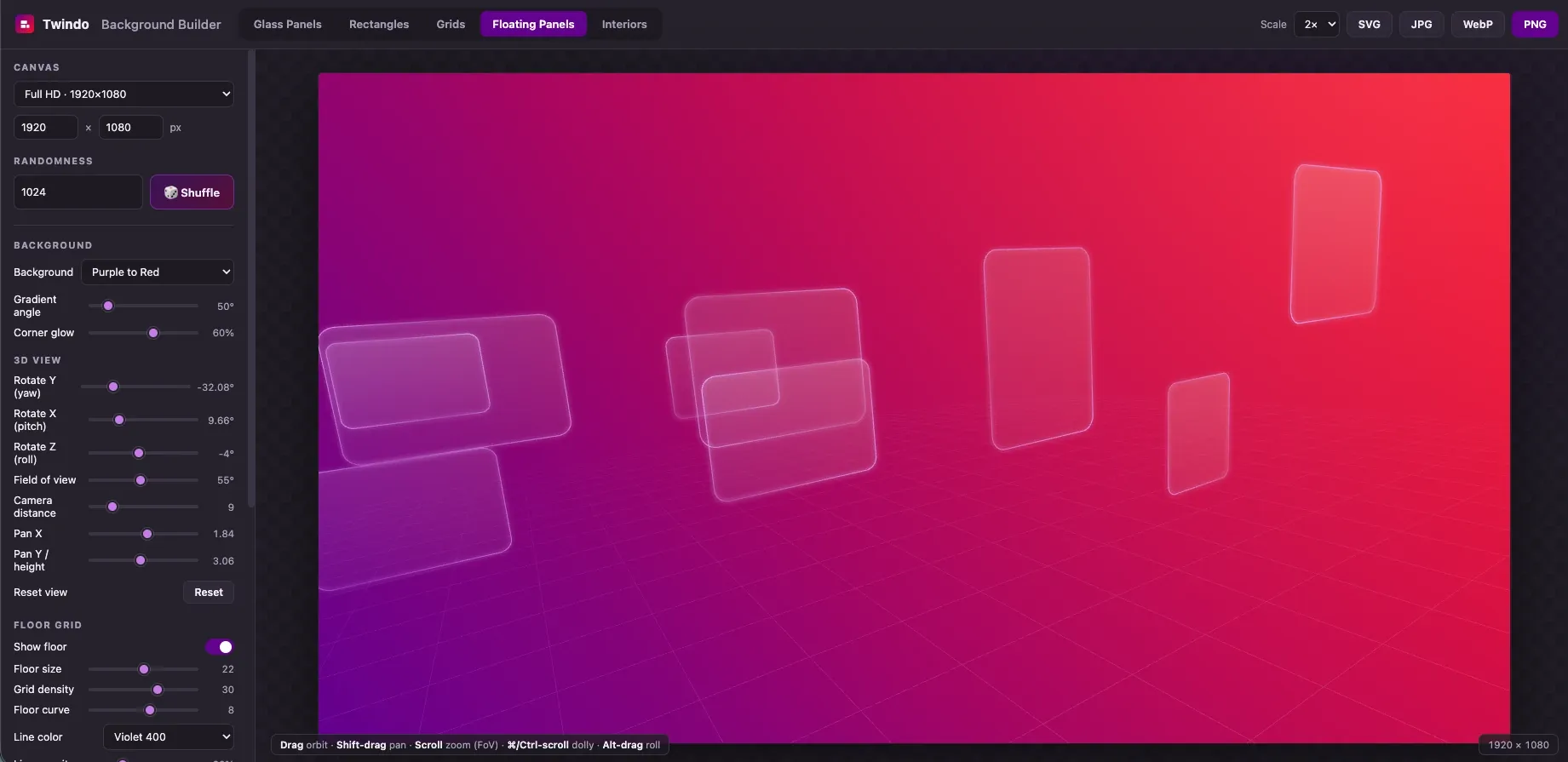
Overview
At a certain production volume, a brand system stops being only a set of visual guidelines and starts looking like a set of programmable rules. I built the Background Builder after realizing it was faster to encode those rules once than to manually draw the four-hundredth variation.
The result is a working production tool rather than a concept or screenshot. Change a style, adjust its parameters, generate a reproducible variation, and export the finished asset directly from the page.
This tool uses a desktop-shaped interface with a control panel beside the canvas.
Open the live tool ↗Background Builder
Five generators cover the background families the Twindo system needs: glass panels, outlined rectangles, perspective grids, floating panels, and architectural interiors. Each began with a reference asset that was reverse-engineered until the generator could produce new work that felt consistent with the hand-built original.
The brand palette, gradients, corner radii, and other visual constraints are encoded into the tool, narrowing the possibility space before anyone begins designing. Seeded randomness makes every useful output reproducible instead of disposable: enter the same number and the same composition returns.
The tool supports fourteen common marketing formats plus custom dimensions up to 8192 pixels. Finished backgrounds export as native SVG or as PNG, JPG, and WebP at up to four times resolution.
One of the more involved modes is Floating Panels. A standard SVG matrix can only create affine distortion, leaving opposite edges parallel. I instead projected every point of the panel outline individually, allowing edges to converge and rounded corners to foreshorten like real perspective. The canvas can then be orbited, panned, zoomed, and rolled directly.
Synthesizing mockups with AI
Twindo had a visually compelling product, but we could not always show the models we produced or the process behind them. Interior scans often depicted operating businesses or private homes, and using those spaces in public-facing work required client and property approvals that were not always practical to obtain.
Modern image-generation tools gave me another route. Using ChatGPT’s image generation and Gemini’s Nano Banana, I could begin with a photograph or generate the kind of environment we commonly modeled. From there, I could create consistent views from different positions as though a camera were moving through the space.
I could also provide examples of our CAD work as style references and generate a synthetic CAD treatment that followed the same underlying geometry. From there, I could pull the view outward into an overhead model or build additional interior perspectives from within the project. The sequence below moves from a synthetic office photograph to its scan visualization and finally to a CAD-style model.
This made possible marketing materials that otherwise would have been blocked by clearance constraints. Because the spaces were synthesized rather than drawn from a real customer project, they could demonstrate the product story without exposing a client’s location or interior.
The same workflow also gave the sales team more relevant material for specific conversations. Ahead of a meeting with a coffee-shop franchise, I could build a coffee-shop example. For a jewelry retailer, I could create a store that reflected that category. Prospective customers could see something much closer to their own environment and understand what Twindo could produce for them without waiting for a perfectly matched approved case study.
The value is not automation for its own sake. It is creating more room for art direction, iteration, and the decisions that still benefit from a designer’s eye, while unlocking product stories the organization could not responsibly show before.